AI chatbots
 Wajih Shaikh
How to Build an AI Chatbot for Your Website in 2026: A Practical Guide
What a reliable chatbot needs beyond a chat bubble: clear scope, trustworthy content, secure infrastructure, retrieval, testing and human escalation.
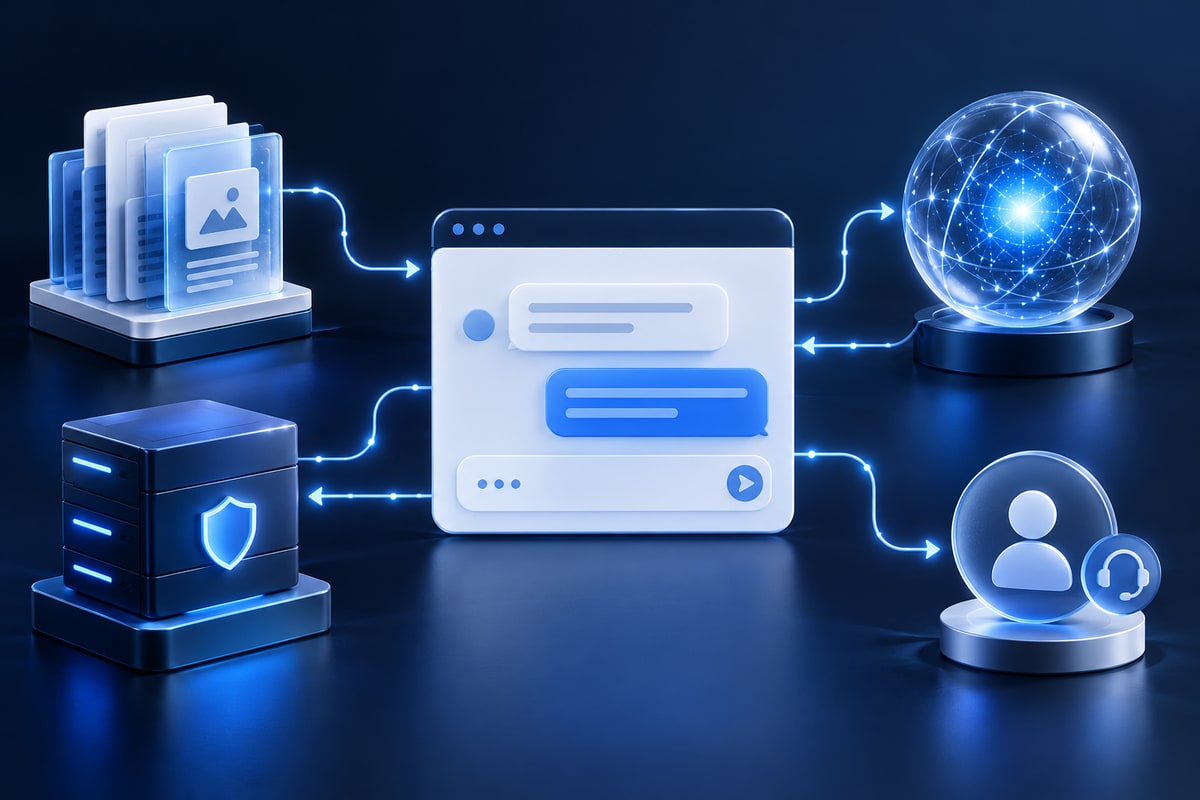
Quick answer: Define the chatbot’s job, prepare trustworthy business content, create an accessible interface, connect it to a secure backend and a language model, add retrieval when it needs document-specific answers, and test accuracy, privacy, security and escalation before launch. You usually do not need to train a foundation model from scratch.
An AI chatbot can help visitors understand services, find information and navigate a website. The challenge is making it reliable. A polished chat bubble that invents policies, leaks information or fails on mobile is not a useful production system.
What is an AI website chatbot?
An AI website chatbot is a conversational application embedded in a website. A user types a question, and the application produces an answer based on a language model, business rules and information it is authorised to retrieve.
Unlike a simple scripted bot, an LLM-powered assistant can respond to varied natural-language phrasing. That flexibility also creates a risk of incorrect answers, so safeguards are essential.
Five components of a reliable website AI chatbot
1. A responsive frontend
The chat interface should support keyboard navigation, mobile screens, error states and a clear route to human support. It can be built with plain JavaScript or the framework already used by the site.
2. A secure backend
The backend accepts requests, applies rate limits and authentication where needed, calls the model provider and enforces business rules. Never place a private API key in browser JavaScript or a public repository.
3. A language model
Select a model based on quality requirements, latency, capabilities, privacy terms and pricing, not benchmark marketing alone.
4. A business knowledge base
Approved pages, policies, FAQs and documents provide context. Keep them current and remove contradictory material, especially prices, promises and regulated information.
5. Retrieval, validation and escalation
A retrieval layer finds source material, validation handles unreliable outputs, and human escalation covers cases that should not be answered automatically.
What is RAG in an AI chatbot?
Retrieval-augmented generation combines search with language generation. The application retrieves relevant information from approved sources before producing an answer.
If a customer asks about cancelling a subscription, a RAG chatbot can search the organisation’s actual policy and reply with a supporting link. If it cannot find reliable information, it should say so instead of guessing.
RAG does not guarantee correctness. Poor source documents, irrelevant retrieval and misleading prompts can still cause errors. It works best with clean content, access control and systematic evaluation. See the OpenAI File Search guide and Retrieval guide.
How to build a custom chatbot step by step
1. Define one useful task
Start with a clear use case such as answering service FAQs, finding documentation, explaining product features or collecting sales enquiries. Write measurable success criteria and an escalation rule.
2. Audit and organise content
Collect approved pages and documents. Identify who owns updates, what may be public and what must remain restricted. Reuse the website’s CMS content when possible instead of maintaining unsynchronised facts.
3. Design a modest architecture
A practical starter flow is: website chat UI → application backend → approved retrieval service → LLM → sourced response or fallback → visitor.
4. Connect the model securely
Make calls from the server. Protect credentials with environment variables or a secrets manager. Add request validation, timeouts, logging controls and rate limits. Minimise private data sent to providers.
5. Implement knowledge retrieval
Index clean content, test exact and conversational questions, retain source references and apply the current user’s permissions before retrieval.
6. Design predictable answers
Require the assistant to separate documented facts from uncertainty, link to relevant sources and say when it cannot confirm something. Enforce permissions outside the model.
7. Build an accessible interface
Use visible focus indicators, labels, readable mobile layouts, error messages and a clear dismiss control. Do not interrupt visitors with an aggressive auto-opening widget.
8. Test realistic and adversarial cases
Test common questions, wrong assumptions, missing information, ambiguity and attempts to override instructions. Measure correctness, retrieval relevance, latency, refusal quality and escalation.
9. Deploy, monitor and improve
Monitor errors, costs, recurring unanswered questions and changing content. Re-run evaluation datasets when prompts, retrieval logic or models change.
AI chatbot security: Common risks
- Prompt injection: malicious instructions attempt to redirect behaviour.
- Sensitive-data disclosure: the system exposes information it should not access.
- Overbroad tools: the assistant can change records without sufficient permission.
- Uncontrolled spending: abusive or accidental requests increase costs.
- Confident errors: a persuasive response is treated as a business fact.
Use least privilege, independent authorisation, request validation, budget limits and human review where stakes are high. The OWASP Top 10 for LLM Applications is a useful security reference.
Does your website need a vector database?
Not necessarily. A small FAQ collection may work with simpler search or managed retrieval. A vector store becomes more useful when the corpus is large, semantically diverse or frequently searched using natural language.
Privacy for US, UK and Canadian customers
Responsibilities depend on the data, customer location and laws applying to the organisation. UK businesses should review ICO guidance on AI; Canadian organisations can consult the Office of the Privacy Commissioner. US obligations may be federal, state or sector-specific. Document collection, retention, processors, access rights and incident response before launch.
How much does a website AI chatbot cost?
Cost depends on the interface, knowledge base, access controls, integrations, usage volume and support expectations. Read AI app development costs in 2026 for a planning framework.
Frequently asked questions
Can I build an AI chatbot without training a custom model?
Yes. Many website chatbots use a third-party model API connected to approved content through retrieval.
Can a custom AI chatbot work with WordPress?
Often, yes, when a secure external backend handles private credentials and the site supports the interface integration.
Should the chatbot answer every question?
No. It should say when information is unavailable and offer human escalation for sensitive or unresolved situations.
Which programming language should I use?
JavaScript, TypeScript and Python are common choices. Use a stack your team can operate securely and maintain effectively.
Can an AI chatbot completely replace customer support?
It can reduce repetitive enquiries, but companies still need people for exceptions, complaints, sensitive circumstances and accountability.
Final thoughts
A production-ready AI chatbot requires more than a model connection. Good results come from trustworthy sources, careful scope, secure infrastructure, rigorous testing and a usable interface.
Next, read AI agents vs chatbots vs automation.
Sources and further reading
Start with one useful job, approved information and a safe fallback. Add autonomy only when testing proves that it improves the experience.